
A note of gratitude can help you strengthen connections. It demonstrates genuine consideration and effort when you make a personal video message. As opposed to plain text, video puts your tone, facial expressions, and emotions in perspective. It gives the appreciation a sense of reality.

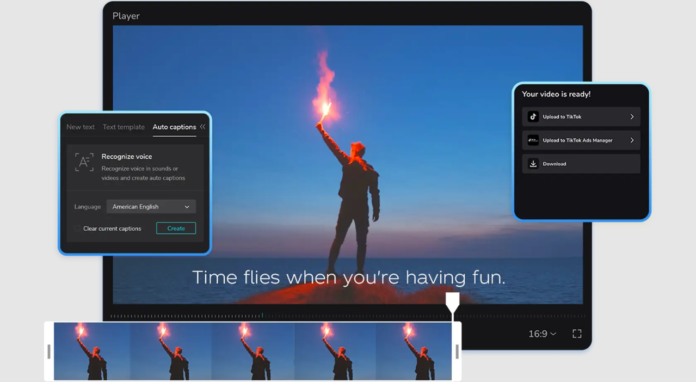
Nowadays, artificial intelligence assists you in making your gratitude creative. The AI caption generator on the CapCut App brings your text to life as a video caption. It enhances clarity and provides your video with an emotional rhythm. With the blend of individuality and AI creativity, your thank you note will no longer be a message, but a moment. CapCut App can assist you with this process by providing an intelligent toolkit that allows you to edit easily, while still keeping your voice natural.
CapCut enables you to create something that is considered thoughtful, warm, and visually pleasing. You feel good regardless of whether you are recognizing a friend, a customer, or a mentor. The app will enable you to take your story to the next level, even if you have never edited a video before.
Choosing an AI Template for Thank You Notes
The templates provided by CapCut offer a solid foundation. These templates fall under different categories, ideal for showing gratitude with a heart, for fun, or in a professional setting. No matter what you want to express gratitude (a gift, a service, or emotional support), there is a template.
One way is to go to the AI lab tab in the CapCut App and use one of the ready-to-edit templates. Here, you will find over 50 styles to suit your mood and occasion. You can preview various visual effects and select a template that aligns with your tone. It makes you consistent with the emotion you need to convey.
Try the animation and music against your message before you commit to them. This allows you to check whether the images and the flow are correct. A thank-you video from a mentor may require a respectful and non-excited tone. A video to a close one may take a lighter or humorous direction. When you match the emotion to the occasion, it makes your message more sincere.
Development of AI Visual Styles Unique Messages
Thank-you notes do not need to be generic. You can transform simple messages into great visual narratives using CapCut AI video maker. Using AI visual styles, such as Warm Watercolor or Cinematic Inspiration, your message turns into art.
Select a style that suits your narrative. A Warm Watercolor picture is suitable for expressing emotional or sentimental gratitude. Cinematic Inspiration effect suits an intense or dramatic appreciative note. All these styles enrich your story and make it memorable.
You may use the AI text-to-video engine in combination with your anecdotes. Include a brief statement of the way the gift benefited or that the support was adequate. These minor details contribute to a stronger emotional appeal, making the viewer feel understood and appreciated.
Inserting Photos, Video Clips, and Personal Details
The thank-you video is even more special with the inclusion of personal footage. You can add clips of the gift unboxing, event highlights, or things you are thankful for. These additions make the story come to life.
CapCut features an AutoCut tool that helps with editing transitions between clips. It also manipulates pace and rhythm to suit the template, which makes your message fluent and refined. You do not need to perform complicated editing. The tool manages transitions, music timing, and the flow of vision.
To enhance the mood, consider using AI-generated music choices and cinematic filters. Soft-toned background music can enhance thankfulness. Warmth can be added using filters such as soft glow or vintage colors. Such minor alterations facilitate the creation of a touching and individual message.
Enhancing Emotional Delivery Using AI Voice-over and Captions
Your voice counts. You can document your thank-you note in the app. If you prefer not to speak, CapCut offers an AI voiceover feature that reads your text with a sincere and clear voice. Pick a tone that suits your story, whether relaxed or jovial.
Your captions should be designed according to the voiceover. To make a viewer focused, utilize animations, emojis, or handwriting fonts. Subtitles can also be turned on. They enhance transparency and convenience, particularly when sharing videos across nations or devices.
Captions can also make your message hit even when the sound is off. Adding a motion or style to your thank-you note makes it seem more alive and professional.
Where and How to Share Thank You Videos
Once your video is ready, you can send it via chat apps or embed it in emails. If the message is more public, share it on social platforms like TikTok or Instagram. You can even compile multiple messages into a Thank You Highlights reel. This works well for client thank-you videos or recap messages after events.
Save your favorite templates for future use. This saves time and helps maintain a consistent tone in future messages.
Design Heartfelt Messages in Seconds
Step 1: Launch and select template Begin by opening CapCut and tapping the “AI Lab” tab from the bottom. This brings you to the smart “AI story maker” feature tailored for fast video creation. Scroll to see templates like “Create story video”, “Create with AI avatar”, or “Create video with scripts”. Pick one that suits the tone of your thank you message.
Step 2: Create and customize note After picking a template, hit the “Try AI workflow” button. Type your message idea into the “creating a video story about” section. Choose a visual aesthetic such as “Realistic film”, “Cartoon 3D”, or “Anime”. Then press “Generate” to produce your thank you video.
Within seconds, you’ll see the result. To personalize more, go to the “Music” tab and add a suitable track. Modify captions using “Caption style”—try adding animations or changing font styles. For full creative access, tap “Go to Edit” and explore CapCut’s advanced features like filters, stickers, and transitions.
Step 3: Save and send Once you’re done editing, tap “Export” in the top-right corner. Your personalized video will be stored on your device. Share it via social media or send it directly as a heartfelt thank-you.
Conclusion
CapCut’s AI tools make meaningful video thank-you notes effortless. You can blend your emotions with smart editing features. This blend of technology and personal touch makes your appreciation stand out. Thoughtful video messages help build trust, connection, and lasting gratitude in both personal and professional settings.