
Retailers increasingly use WhatsApp groups to coordinate store events, support local communities, communicate with partners, and manage customer interest groups. However, the contact information generated through these conversations often remains separate from spreadsheets, customer relationship management systems, and other retail tools. A WhatsApp Group Number Export tool can help retailers organize contacts from relevant groups into structured files for review.
Exporting numbers is only the first step. Retailers must still determine why each contact was collected, remove duplicate records, confirm permission for future communication, and protect the resulting files. A reliable workflow treats WhatsApp group data as information that requires verification rather than as an automatic marketing list.
Why Retail Contact Data Becomes Fragmented
Retail contact information can originate from physical stores, ecommerce platforms, loyalty programs, events, social media, and messaging applications. Without a consistent process, different teams may maintain separate and incomplete records.
Customer Conversations Often Sit Outside the CRM
Store employees may create WhatsApp groups for product launches, workshops, appointment reminders, community events, or customer support. These groups can be useful for immediate communication, but their participants may not appear in the retailer’s central customer database.
Manual copying is possible for a small group, but it becomes inefficient when a business manages several locations or recurring events. Employees may also record names and numbers in different formats, making later comparison difficult.
Store, Event, and Partner Groups Can Overlap
The same person may participate in multiple groups. A supplier could belong to both a vendor group and a store-opening group, while a customer might join separate groups for local events and product updates.
Combining these records without preserving their original group information can remove valuable context. Retailers may no longer know where the contact came from or why the individual joined a particular conversation.
Group Membership Does Not Equal Marketing Consent
Participation in a WhatsApp group does not automatically demonstrate permission to receive promotional messages through another channel.
A customer may have joined a group to attend one event or obtain support for a purchase. Retailers should therefore keep the technical process of exporting contact information separate from the legal and operational process of verifying consent.
Define the Retail Use Case Before Exporting
Before processing any contacts, the retailer should identify the business purpose and decide which groups are relevant.
Identify Retailer-Managed Groups
The workflow should focus on groups that the organization owns or is authorized to manage. These may include:
- store event and workshop groups;
- retailer-operated customer communities;
- franchise or branch coordination groups;
- approved supplier and wholesale partner groups;
- internal retail operations groups.
Personal groups and unrelated communities should not be included simply because an employee can access them.
Separate Different Types of Participants
Customers, employees, suppliers, administrators, and business partners should not be combined into one undifferentiated file.
Separating these audiences reduces the risk of sending inappropriate communications. It also helps teams apply the correct retention, access, and consent rules to each category.
Choose Only Necessary Data Fields
Retailers should collect only the information needed for the defined purpose. Depending on the workflow, useful fields may include the phone number, country code, display or saved name, group name, and whether the number is already saved.
Additional classifications can be added during review, but assumptions about customer status, preferences, or consent should not be inferred from group membership alone.
How to Export WhatsApp Group Contact Data
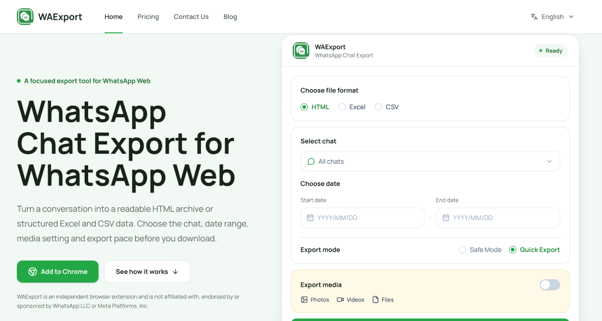
WAExport operates as a Chrome extension alongside WhatsApp Web. It can process one, multiple, or all accessible groups and export the resulting information into structured formats.
Select the Relevant Groups
After installing the extension and opening WhatsApp Web, the user can select the groups required for the approved retail task.
Limiting the export to relevant groups makes the file easier to review and reduces unnecessary collection. For recurring workflows, retailers can document which groups belong to each store, event, or operating function.
Apply Filters Before Downloading
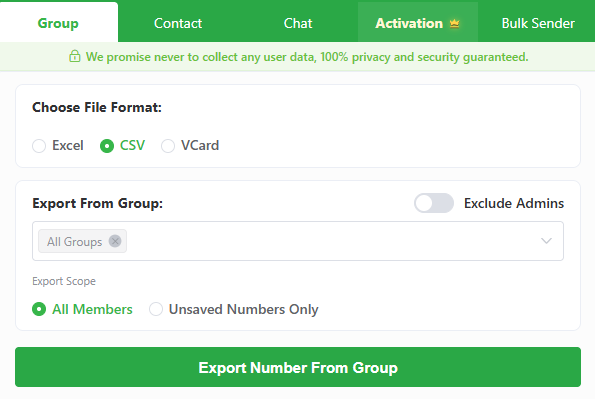
A WhatsApp group contacts extractor can filter unsaved phone numbers and exclude group administrators when they are not part of the intended dataset.
These options can reduce manual cleanup, but the file should still be inspected after downloading. An administrator may also be a customer or employee, while an unsaved number may not contain enough information to identify its owner.
Choose the Appropriate File Format
WAExport supports XLSX, CSV, and VCF exports. Each format serves a different retail workflow:
- XLSX is useful for manual review, tagging, and reconciliation;
- CSV can prepare verified records for import into compatible CRM or loyalty systems;
- VCF is suitable for creating approved device contact lists.
The tool generates the specific export file locally in the browser rather than uploading that file to its servers. Retailers should still protect the downloaded copy and store it only in approved locations.
Clean and Organize the Exported Records
Raw contact data should be reviewed before it enters any operational system.
Remove Duplicate Numbers
Phone numbers provide a practical starting point for identifying duplicate records across groups. Retailers should standardize the number format before comparing files because the same contact may appear with different spacing, punctuation, or country-code conventions.
Duplicate removal should not erase useful source information. If one customer belongs to several approved groups, the record can retain those group names as separate source fields.
Standardize Names and Country Codes
Display names may include abbreviations, emojis, store references, or informal labels. Teams can normalize these fields where reliable information is available, while leaving uncertain records unchanged for later verification.
Country codes should also be checked, especially when the retailer serves tourists or operates across international markets.
Preserve the Original Context
A well-structured retail file should show where each record originated. Relevant source fields may include:
- store or branch;
- WhatsApp group;
- event or campaign;
- date of export;
- contact category;
- permission status;
- last verification date.
This context helps employees understand how a record may be used and prevents unrelated audiences from being combined.
Prepare the Data for Retail Systems
Once the file has been cleaned, it can be matched against existing retail records.
Review Records in a Spreadsheet
A spreadsheet allows teams to inspect missing names, duplicate numbers, inconsistent country codes, and unclear group sources before importing anything.
It can also be used to flag records that require consent confirmation or review by a store manager.
Import Only Verified Contacts
A CSV export can be prepared for a compatible CRM, customer service platform, or loyalty system. WAExport does not automatically connect exported records to these platforms, so retailers must follow the destination system’s import requirements.
Only approved and verified fields should be imported. A retailer should not label every group participant as a customer, lead, or subscriber without supporting information.
Protect Customer Trust and Privacy
Contact data should be handled with the same care as information collected through ecommerce checkouts, loyalty programs, and customer service systems.
Verify Consent Before Outreach
Before sending promotional messages, retailers should confirm that the planned communication matches the permission provided by the recipient. The consent record should specify the relevant channel and purpose where required.
Customers should also have a clear method for withdrawing permission.
Restrict Access to Exported Files
Downloaded files should be available only to employees who need them for the approved task. Retailers can use controlled folders, access permissions, and defined ownership to prevent informal copies from spreading across personal devices.
Establish Retention and Deletion Rules
Exported files should not be stored indefinitely. Each retailer should determine how long the working file is needed, when verified records may move into an approved system, and when temporary copies must be deleted.
Build a Repeatable Retail Contact Workflow
WhatsApp group contact export is most useful when it forms part of a documented process. Retailers should define who may perform exports, which groups may be included, how records are cleaned, who verifies consent, and where the final information is stored.
This turns scattered group information into structured retail data without treating every available number as a marketing opportunity. The result is a more practical contact-management workflow that supports store operations while maintaining customer trust.