
At 9:05 on the first morning of a holiday campaign, a merchandising coordinator updates the banner on a retailer’s Canadian store. Seven minutes later, the US team discovers that its promotion has disappeared. Both employees had been switching between regional storefronts in the same browser, and one of them edited the wrong account.
The mistake takes only minutes to correct. Finding out why it happened takes much longer.
This is the less visible side of multi-store growth. A retailer may successfully launch new storefronts, marketplaces, advertising accounts, and social commerce channels while continuing to rely on browser workflows designed for a much smaller business.
Employees move between similar dashboards. Agencies request access to client accounts. Regional teams need different configurations and permissions. Login sessions, browser extensions, and account settings accumulate across personal computers. The company may have added more selling channels, but it has not built an operating system for managing them.
Reliable multi-store e-commerce operations begin by giving every store, employee, and automated process the correct working context before a task starts.
Why Multi-Store E-Commerce Management Starts to Break
A single online store usually has a recognizable set of systems: an e-commerce platform, an advertising account, analytics, email marketing, customer support, and perhaps one or two marketplace integrations.
A multi-store retailer repeats that structure across brands, countries, or sales channels. The number of possible errors grows faster than the number of stores because employees must also remember which account, region, permission level, and browser configuration belong together.
The pressure becomes especially visible during product launches, seasonal promotions, regional expansion, and staff changes.
| Operational layer | Common multi-store problem | What the team needs |
| Regional storefronts | Similar dashboards make it easy to update the wrong market | Clearly separated and labeled workspaces |
| Marketplace accounts | Login sessions and settings become mixed across platforms | Persistent browser environments for each authorized account |
| Advertising operations | Teams may confuse brands, currencies, or campaign regions | Role-specific access and a clear account context |
| Agency collaboration | External partners receive broader access than their work requires | Controlled access to assigned environments |
| Staff transitions | Important sessions and configurations remain on personal devices | Company-managed workspaces that survive personnel changes |
| Repetitive workflows | Manual effort increases with every new store | Gradual automation with review and recovery steps |
Password managers can improve credential storage, and native platform permissions remain essential. Neither one, however, provides a complete browser workspace containing the correct session, extensions, settings, bookmarks, and operating context for a specific store.
That gap is where many multi-store workflows become unreliable.
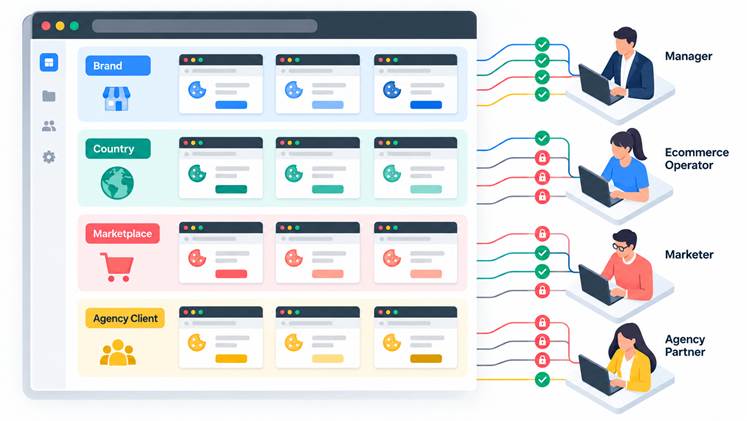
A Multi-Store E-Commerce Example
Consider a Canadian retailer expanding into the United States and the United Kingdom.
The company operates three Shopify storefronts, two marketplace seller accounts, regional advertising campaigns, separate customer communication channels, and several analytics tools. An internal team manages pricing and merchandising, while an agency handles paid media and regional contractors prepare localized content.
At first, the company records access information in a spreadsheet. Employees create bookmarks and manually sign in to whichever system they need. Everyone knows the arrangement is imperfect, but replacing it does not feel urgent.
Then the business enters a busy promotional period.
A contractor prepares UK content inside the Canadian store. A media buyer opens the wrong advertising account and has to verify every change made during the session. An urgent update is delayed because its authentication request goes to an employee who is unavailable. Management cannot easily determine which browser setup was used for a disputed change.
None of these incidents necessarily causes a major loss on its own. Together, they consume management time and make every new store harder to support.
The root problem is not employee ability. The workflow expects people to hold too much account context in their heads.
A stronger system makes the correct context visible. Instead of telling an employee to “open the right account,” the retailer assigns a clearly named workspace associated with the store, market, and task.
How Browser Profiles Improve Multi-Store Management
A dedicated browser profile is a saved environment for a particular store, brand, market, or operational role. It can retain the relevant login state, browser data, extensions, bookmarks, and configuration without mixing them with unrelated operations.
The objective goes beyond organizing browser tabs. Each profile creates a recognizable boundary around a specific area of work.
A retailer might maintain profiles such as:
- North America | Brand A | Shopify Operations
- Canada | Brand A | Paid Media
- United Kingdom | Brand A | Customer Support
- Global | Brand B | Marketplace Operations
- Agency Access | Brand B | Social Commerce
- Management | Cross-Store Analytics
The naming convention is not a minor detail. Labels should be clear enough that an employee can select the correct environment during a busy shift without opening it first.
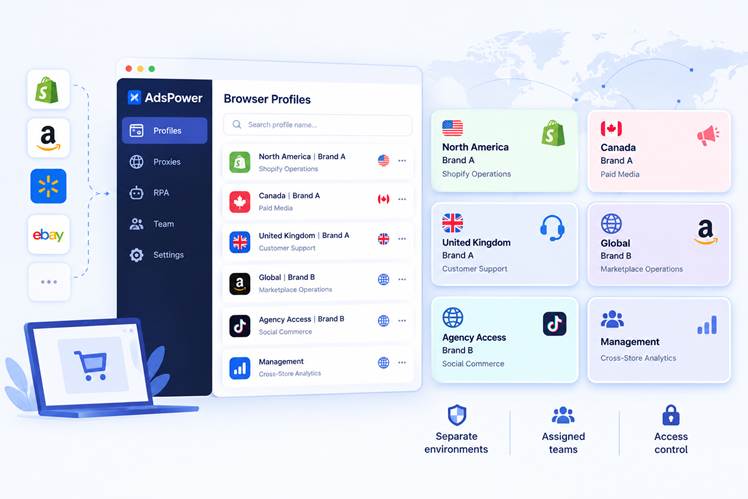
Multi-store management works best when each storefront is treated as an operational unit with an assigned environment, responsible team members, and defined access rules. Retailers can organize environments by country, brand, marketplace, or client depending on how the business is structured.
This model also improves continuity. A new employee does not have to reconstruct a working setup from scattered instructions. If someone leaves the organization, the company can remove that person’s access while retaining the environment required to operate the store.
How an Anti-Detect Browser Fits into E-Commerce Operations
Browser environment tools are sometimes treated as highly specialized technology. For legitimate retail teams, their practical value is more straightforward: they provide a structured way to maintain separate working environments at scale.
An anti-detect browser such as AdsPower can help authorized teams create and manage individual browser profiles for different stores, markets, and operational responsibilities.
Within AdsPower, browser profiles can be grouped and labeled according to a retailer’s own structure. One organization may group profiles by brand, while another may organize them by country, marketplace, or agency client. Each profile maintains its own browser data and working context.
Team permissions add another layer. Managers can assign environments to the people responsible for them instead of distributing every credential to every employee. This does not replace the native security controls of Shopify, Amazon, advertising platforms, or other services. It complements them by making access at the browser-workspace level easier to organize.
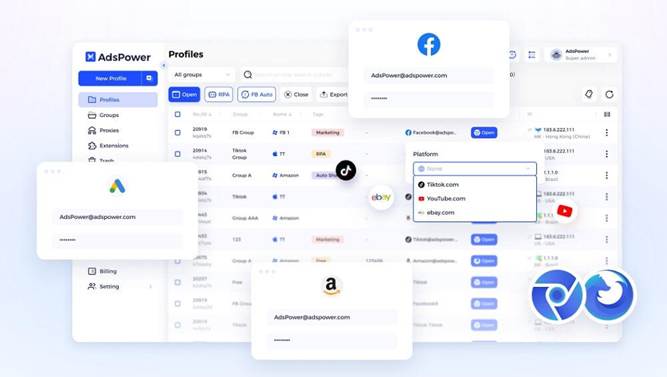
Browser profiles can be organized around the retailer’s structure, while access is assigned according to each team member’s responsibilities.
The purpose is operational separation and authorized team management. Retailers must still comply with the policies of every marketplace, advertising service, and commerce platform they use. A managed browser environment should make legitimate work more consistent, not provide a reason to ignore platform requirements.
A Five-Step Multi-Store E-Commerce Operations Workflow
Technology works best after the retailer has defined who owns each store, which systems are involved, and where approval is required. The following process provides a practical starting point.
Map Every Store, Account, and Owner
Begin with an inventory of storefronts, marketplace accounts, advertising dashboards, customer communication channels, analytics platforms, and supplier portals.
For each system, record its brand, region, internal owner, approved users, business purpose, and data sensitivity. Include the native permission controls already available inside the platform.
This exercise often identifies problems before any new technology is introduced. Teams may discover inactive accounts, overlapping responsibilities, contractors who still have access, or important systems without a clear owner.
A useful test is simple: if an employee sees an unfamiliar login alert, does the company know exactly who should investigate it? If the answer depends on asking around, ownership is not yet clear enough.
Create Browser Profiles Around Real Responsibilities
A single environment for an entire department is often too broad.
A merchandising specialist updating product pages may not need advertising billing access. A media agency may need campaign dashboards but not customer order records. A support contractor may require access to one regional store without seeing another market’s operation.
Profiles should reflect the smallest practical area of responsibility. This makes the workspace easier to understand and limits unnecessary access.
Retailers should also adopt a consistent naming format. A simple structure such as Market | Brand | Function is easier to scan than a collection of profile names created independently by different employees.
Assign Access Instead of Rebuilding Setups
Once profiles are established, managers can assign them to the relevant employees or external partners.
This is more reliable than asking each person to recreate browser configurations on a personal device. It reduces dependence on informal instructions such as “use the second Chrome profile” or “ask the previous account manager which extension to install.”
Access should be reviewed after role changes, agency transitions, seasonal hiring, and market closures. A quarterly review may be sufficient for a stable team, while rapidly changing organizations may need a monthly process.
The review should answer three questions:
- Does this person still require access?
- Is the access appropriate for the person’s current role?
- Does the environment contain anything the person does not need?
Separate Routine Tasks from High-Risk Decisions
Not every browser action has the same business impact.
Opening a reporting dashboard is different from changing a product price. Preparing a post is different from publishing it. Checking whether a campaign is active is different from increasing its daily budget.
Retailers should document the actions that require additional approval. These commonly include refunds, pricing changes, new permissions, banking information, advertising budgets, and public brand communications.
This step is essential before automation. If the company has not decided where human approval belongs, automation can make an unclear process run faster without making it safer.
Automate One Stable Workflow at a Time
The best first candidates for automation are frequent, rules-based, reversible, and easy to verify.
A retailer might begin with a workflow that opens an assigned browser profile, visits an approved reporting page, checks whether expected information is available, and prepares the result for an employee. The final interpretation remains with a person.
AdsPower offers RPA for predefined browser processes and a Local API for organizations that want to connect profile management with internal systems. RPA may suit repeatable visual tasks, while API access gives technical teams more flexibility for custom integrations.
A limited pilot is more useful than an ambitious rollout. Start with one store, one workflow, and a clearly defined fallback procedure. Run it long enough to encounter ordinary variations rather than judging it after one successful demonstration.
What Retail Teams Learn When They Automate Too Early
One of the most common automation mistakes happens before a workflow is ever built: the team assumes that everyone performs the task in the same way.
Ask three experienced operators to complete a routine store check, and they may take three different paths. One verifies inventory first. Another checks recent orders. A third opens a reporting tool before entering the store dashboard.
Automation does not resolve that inconsistency. It simply turns one version of the process into a repeatable sequence.
A practical discovery method is to ask an experienced operator to perform the task while describing each decision aloud. Record where the person pauses, checks another source, or makes a judgment based on context.
Those pauses reveal the boundary between a stable rule and human expertise.
Teams should also measure more than time saved. A useful pilot tracks correction rates, failed steps, wrong-store actions, manual recovery time, and the number of exceptions requiring employee judgment.
A process that runs quickly but regularly needs repair may be less valuable than a slower workflow that is transparent and easy to audit.
How AI Agents Support E-Commerce Workflow Automation
Rules-based automation works well when every step is known in advance. Retail operations also contain requests expressed in ordinary business language:
“Create a new browser profile named XXX, assign it to the group XXX, and configure the proxy Proxy Information. After creation, return the profile name, group, proxy status, and profile ID.”
“Open the browser profile with ID XXX,open platform XXX, and use the current account to publish XXXXXX. Pause the task and report the reason if verification, upload failure, or publishing restrictions occur.”
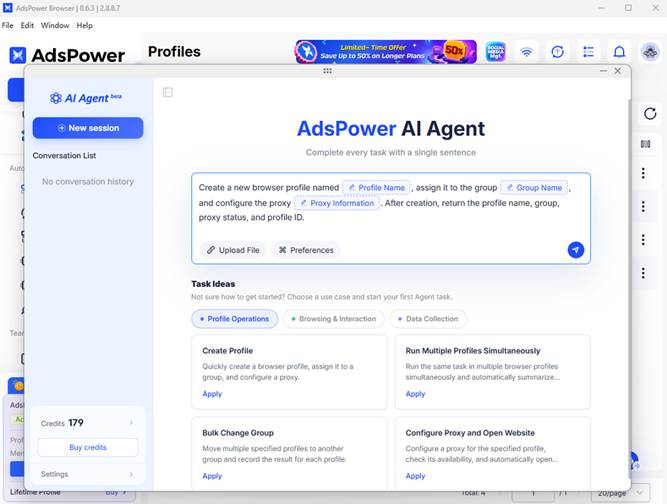
AdsPower’s recently launched AI Agent allows users to create and operate browser profiles through natural-language instructions. It can also perform selected browser tasks, including publishing approved content to accounts. Organizations can connect their own MCPs and Skills to extend the workflows available to the agent.
This gives employees another way to interact with the operational environment. Instead of navigating each configuration screen manually, an authorized user can describe the intended task conversationally.
Natural language does not eliminate the need for governance. A vague request can be just as ambiguous to an AI agent as it would be to a new employee.
Before allowing an agent to participate in production workflows, retailers should define which profiles it may access, which actions it may complete, and which steps require confirmation. The team also needs a recovery process for unexpected page changes, authentication requests, incomplete information, or actions that fall outside the approved workflow.
For many retailers, automation will operate in layers:
- Manual profiles for sensitive or unfamiliar work
- RPA for stable, repetitive browser sequences
- APIs for connections with internal systems
- AI Agent and MCP integrations for natural-language task coordination
- Human approval for consequential decisions
The strongest system is not necessarily the one with the highest level of automation. It is the one that assigns the appropriate level of automation to each task.
Use E-Commerce Automation Where It Adds Control
The best automation candidates are routine, rules-based, and easy to verify. These may include opening the correct browser profile, navigating to approved pages, collecting authorized operational information, running standard checks, or preparing content for review.
Actions involving pricing, refunds, advertising budgets, customer disputes, permissions, or public brand communications should retain human oversight. The higher the potential impact on customers, payments, or platform compliance, the stronger the approval process should be.
Retailers should apply the same principle when choosing multi-store management technology. Profile capacity and feature count matter less than a few practical questions:
- Can environments be organized around actual stores, brands, and team roles?
- Can managers limit access and review sensitive actions?
- Can the system progress from manual workflows to RPA, API, and AI-assisted operations?
- Is there a clear recovery process when a workflow fails or a platform changes?
A flexible platform should allow retailers to automate gradually instead of forcing every task into the same model. Manual work, RPA, APIs, and AI agents each have a place. The right choice depends on the risk, frequency, and complexity of the task.
Automation is most useful when it reduces repetitive work while keeping responsibility visible.
Build E-Commerce Operations That Can Grow
New storefronts can be launched quickly. Building a team that operates them consistently takes longer.
As retailers expand across brands, marketplaces, and countries, mixed browser sessions, shared setups, unclear permissions, and undocumented routines create more opportunities for error. Dedicated browser profiles give each store a recognizable working context, while team permissions align access with responsibility.
RPA and APIs can handle stable processes, and AI agents make selected tasks easier to initiate through natural-language instructions. Together, these capabilities show how browser profile management is becoming part of the operating infrastructure for distributed e-commerce teams.
The goal is not to automate every decision. It is to ensure that employees and automated processes enter the correct store with the correct permissions and context. With that foundation in place, retailers can add new markets and channels without adding the same level of operational confusion.