

Marketplace sellers are using AI to turn product photos into 3D models because it removes the old barriers of high cost, long production times, and advanced technical skills.
Instead of hiring 3D specialists or sending physical products to costly scanning studios, merchants can now turn regular product photos into accurate, interactive digital assets within minutes. This change fits the demanding business model of online commerce: shoppers expect detailed, interactive product views before buying, while sellers need simple systems that can support fast-moving catalogs.
As spatial computing, mobile shopping, and interactive web previews become more familiar to shoppers, flat images often do not provide enough information. Two-dimensional photos may not show true depth, size, or surface detail, which can make buyers hesitate and increase returns.
Modern AI reconstruction tools-from web-ready GLB workflows to options such as an image to STL converter for physical checks and fabrication-help close the gap between an online listing and the real product without greatly increasing the visual production budget.
Platforms such as Meshy AI have pushed this further by putting the whole pipeline in a browser tab. There is nothing to install, a free tier covers early testing, and the same system generates from both text prompts and product photographs, so a seller can start from whichever asset they happen to have.
What AI Image-to-3D Conversion Does
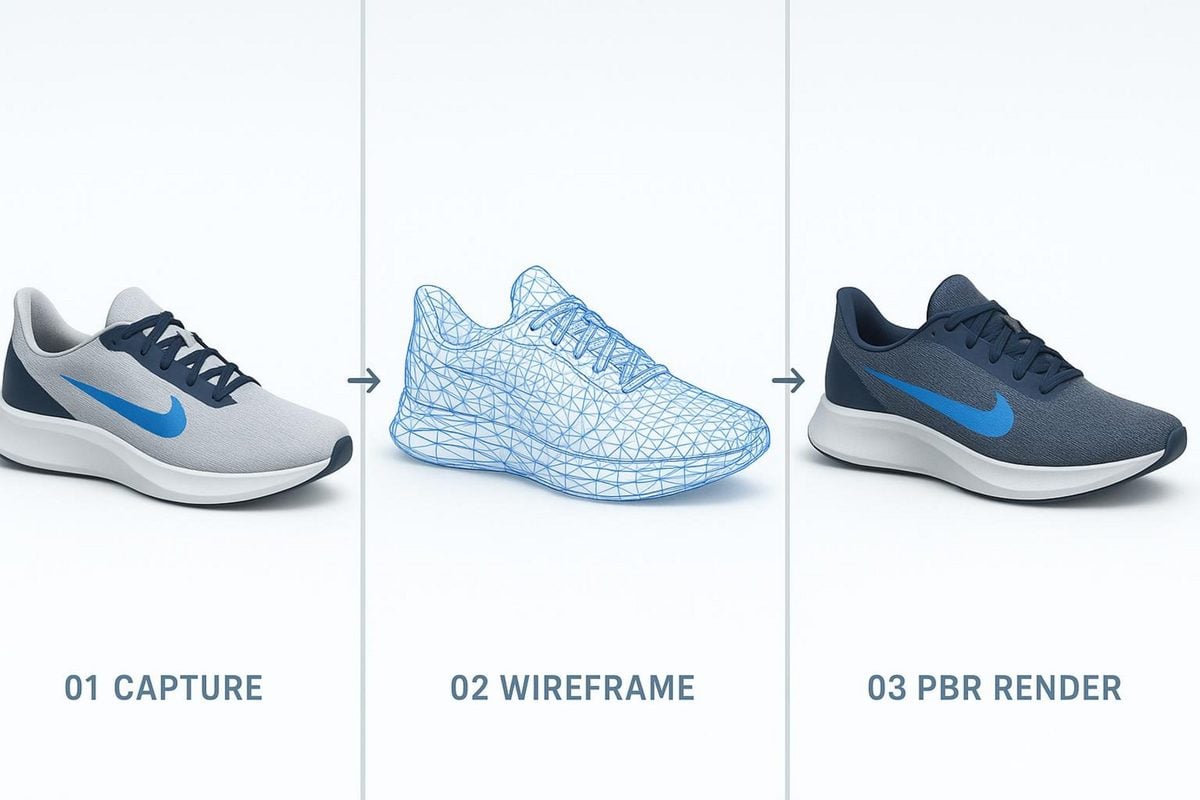
AI image-to-3D conversion works by making an informed estimate of an object’s shape in space. People can understand a three-dimensional form from a flat photo because the brain reads light, shadows, perspective, and material clues. Modern generative AI systems and neural rendering models perform a similar task. They study pixel patterns to estimate the shape and surface curves that are not directly visible in the image.
These systems do more than stretch a flat cutout or place a picture around a simple cylinder. Neural networks create volume, polygon meshes, and texture maps by comparing the image with large collections of 3D shapes. This helps them identify the likely structure of products such as shoes, furniture, tools, and accessories.
How AI Reconstructs Shape, Depth, Materials, and Texture
The process starts with depth estimation and object segmentation. The AI separates the image into different surfaces and estimates how far each visible part is from the camera. Using volume reconstruction methods and learned image patterns, the system predicts hidden areas of the product. It may use symmetry and common product shapes to estimate the back and other unseen sides.
After creating the basic volume, the system organizes surface information into standard Physically Based Rendering (PBR) texture channels. It separates the product’s true color from lighting that was captured in the original photo. It also estimates how smooth or rough each area is and creates normal or bump maps for small surface detail. This helps the model react naturally to changing light on a website.
What a Marketplace-Ready 3D Model Contains
A usable e-commerce 3D asset is more than a large collection of points. It needs to be a small, efficient digital package that loads quickly on the web. A high-poly model with millions of vertices can slow down or crash a mobile browser, which hurts the shopping experience and site speed. A marketplace-ready model must balance visual detail with a reasonable file size.
These assets are usually saved in web-friendly formats such as glTF or GLB, with USDZ used for Apple AR experiences. As a general guideline for responsive web use, they include an optimized polygon mesh, often below 50,000 to 100,000 triangles, along with efficient UV coordinates and compressed texture maps, usually at 1K or 2K resolution. Exact limits vary by marketplace, so check each platform’s specifications before export. The model also needs accurate real-world scale data so an AR viewer shows a 12-inch vase at 12 inches instead of making it the size of a car.
Which Product Photos Produce the Best AI 3D Models?
AI systems depend heavily on the quality of the source images. A tool cannot estimate accurate geometry from a blurry photo taken in uneven room lighting. The product’s physical features and the quality of the photos directly affect whether the result needs a small amount of cleanup or becomes unusable.
Products with clear edges and strong contrast usually produce the best geometry. When the system can tell where a product ends and the background begins, it can create more accurate boundaries. Items with unclear shapes, strong reflections, or transparent parts need more care.
The number of source views matters as much as their quality. A single photograph forces the system to infer everything it cannot see, and symmetry assumptions break down on asymmetric products. Meshy supports multi-image input, a 2026 upgrade that feeds several reference angles into one reconstruction, and the improvement in geometric accuracy is clearest exactly where single-image generation struggles: rear faces, undercut seams, handle joins, and recessed hardware. Sellers with a standard four-angle catalog shoot already have everything the better path needs.
Best Subjects: Simple Shapes, Hard Surfaces, and Visible Details
Hard-surface products are often the easiest subjects for AI 3D generation. Consumer electronics, packaged items, shoes, ceramics, modular furniture, and structured luggage tend to produce strong results. They have recognizable shapes such as cubes, cylinders, bevels, and seams that AI systems can convert into clean polygons.
Products made from sheer fabric, loose knitwear, fine hair, or highly reflective and transparent materials are more difficult. Glass, clear acrylic, and polished chrome jewelry can cause major problems. Reflections show the surrounding environment instead of the actual surface, while transparent materials make the object’s true boundary hard to identify.
Image Resolution, Lighting, and Background Requirements
Use even, diffused lighting to give the AI model a clear source image. Hard directional shadows may look like physical parts of the product or dark marks on its surface. Soft light boxes or balanced studio lights spread light across the item and reveal its natural shape and texture.
Image size and framing also matter:
- Clean Isolation: Photograph the product against a plain, high-contrast background, such as seamless white or 18% neutral gray. Remove clutter from the scene.
- Pixel Density: Let the product fill 75% to 85% of the frame and use at least 2000×2000 pixels. This helps preserve details such as stitching, buttons, and embossing.
- Depth of Field: Use a narrow aperture, such as f/8 to f/11, so the full product stays sharp. Avoid strong background blur that softens important edges.
STL Exports for Prototypes, Spare Parts, and Packaging Checks
Marketplace 3D work does not stop at the browser. Sellers who manufacture, customize, or bundle their own products often need the same asset in STL, the format that slicers and desktop 3D printers expect. Converting a product image into STL lets a seller print a test fixture, check that an accessory mates with the main product, or verify that an item fits inside a proposed shipping box before ordering a pallet of them.
Physical output is less forgiving than a web viewer, though. A model can look correct on screen and still fail on a print bed because a wall is thinner than the nozzle can lay down, or because the mesh is not watertight and the slicer cannot decide what counts as inside. Ask vendors for evidence on this point from outside their own marketing. Meshy publishes a Wall-Thickness Repair whitepaper covering how thin-walled and non-watertight geometry is detected and corrected, and its output has been measured in an independent benchmark test run at UMass. Those figures are a better guide to print reliability than any feature list.
For the small jobs around fabrication, the free browser-based 3D tool suite on meshy.ai handles conversion between STL, OBJ, GLB, and FBX, STL repair, model splitting for parts larger than the build plate, and polygon reduction — none of which requires installing a modeling package.
Where Marketplace Sellers Use AI-Generated 3D Models
After conversion and optimization, these 3D assets can support several customer contact points across online retail. A responsive model offers more value than a standard photo gallery because it creates an interactive product experience on desktop and mobile devices.
Marketplace platforms and custom online stores are adding more tools for spatial shopping. Sellers with high-quality 3D assets can turn on these built-in features quickly and stand out from competitors that still use standard photo grids.
Shopify and Custom Storefront Product Pages
Direct-to-consumer platforms such as Shopify and WooCommerce, along with custom headless stores, support 3D files through web components such as Google’s <model-viewer>. Adding one GLB file to a product’s media library gives the usual image carousel an interactive 3D option. Shoppers can rotate the model, zoom in on details, and inspect it from different angles without installing a separate plugin.
Brands also use these models in interactive product customizers. Once the base shape is digitized, sellers can change colors, patterns, and materials with code. Shoppers can view personalized versions without the merchant having to photograph every variation.
Augmented Reality Previews in Mobile Shopping
More than half of online marketplace purchases take place on mobile devices. With mobile tools such as Apple Quick Look on iOS and Scene Viewer on Android, an AI-created 3D model can appear inside a shopper’s room with one tap from a mobile browser. A separate app is not required.
This is especially useful for products that depend on room or body size, including furniture, luggage, appliances, fitness equipment, and artwork. Someone shopping for a floor lamp can place a true-scale digital version beside a living room sofa. This helps confirm its height, shade clearance, and visual fit before the purchase.
How 3D Models Improve Marketplace Performance
Adding 3D views is more than a visual change; it can be measured as a business investment. Online stores often work with small profit margins, so small gains in engagement, sales, and customer satisfaction can create a meaningful financial result. Interactive models reduce uncertainty at several points in the buying process.
When shoppers receive more information about a product, they have fewer reasons to leave the page or abandon the cart. They spend less time wondering about missing angles and more time imagining the product in daily use.
Reduces Uncertainty About Size, Shape, and Design
Unclear size and shape remain major problems in online shopping. Wide-angle photos can change the appearance of proportions, and a lack of nearby size references can leave shoppers guessing about the real dimensions. This uncertainty may cause people to delay their purchase while they search for more information, and many never return.
Interactive models fill in these missing details. By rotating the item, shoppers can quickly understand its thickness, curves, and proportions. When the model also works in AR at the correct scale, much of the guesswork disappears and buyers can make a more confident decision.
What Sellers Should Measure: Interactions, Add-To-Cart Rate, Conversion, and Returns
To measure the value of AI 3D content, marketplace sellers should track four main results across their listings:
| Metric | Primary Impact | Why It Changes |
| Interaction Rate & Dwell Time | More engagement | Shoppers spend more time rotating, moving, and inspecting 3D products than they usually spend clicking through still photos. |
| Add-to-Cart (ATC) Rate | Faster buying intent | Extra visual information removes small doubts and helps interested shoppers move to the cart sooner. |
| Overall Conversion Rate | More sales | Shoppers who understand an item’s size and shape clearly are more likely to buy than those who see still images alone. |
| Product Return Rate | Lower operating costs | Better product understanding can reduce returns caused by an item looking different than expected or having the wrong size. |
AI Image-to-3D Compared With Traditional 3D Scanning and Modeling
Choosing a 3D method requires knowing when an automated option is enough and when a studio process is still needed. AI generation has improved quickly, but it works alongside established methods such as manual polygon modeling and industrial laser scanning or photogrammetry.
The right choice depends on the needed accuracy, production speed, and budget. For many online product listings, fast and affordable visual content matters more than sub-millimeter precision, which makes AI a practical option.
Speed, Cost, and Accessibility
Manual modeling requires trained artists who can use programs such as Blender, Maya, or 3ds Max. Building one asset from the beginning involves creating the mesh structure, laying out UVs, baking normal maps, and testing the final render. This can take several hours or several days per product. Photogrammetry systems capture surfaces faster, but they need many cameras, controlled studio conditions, and heavy point-cloud processing.
AI image-to-3D tools avoid many of these steps by using existing product photos. Production can fall from days to minutes, while costs also drop. Marketing and catalog teams without specialist graphics training can create, revise, and publish models themselves.
| AI Image-to-3D | Photogrammetry | Manual 3D Modeling | |
| Time per asset | Minutes | Hours | Hours to days |
| Input required | Existing product photos | Physical item plus controlled capture rig | Reference images, drawings, or CAD |
| Skill needed | None beyond a browser | Photography and processing knowledge | Trained 3D artist |
| Typical accuracy | Good for visual commerce | High on captured surfaces | Exact, to whatever spec is supplied |
| Cost profile | Free tier upward | Equipment and studio time | Per-hour or per-asset artist fees |
| Breaks down on | Glass, chrome, sheer fabric | Reflective and featureless surfaces | Nothing, but cost rises sharply |
When Professional 3D Modeling Remains the Better Choice
AI image-to-3D does not fit every project. High-precision industrial products, medical equipment, architectural parts, and luxury watches still need the millimeter-level accuracy of CAD and manual 3D work. If the file will guide injection-mold production or engineering stress tests, an AI estimate is not enough.
Highly reflective luxury items, including diamond jewelry, cut crystal, and polished chrome watches, can also confuse AI systems. For expensive products with demanding visual standards, hiring a skilled 3D artist who uses accurate ray-tracing methods can still be a sound investment.
How to Choose an AI Tool for Marketplace 3D
As spatial shopping grows, more AI 3D tools are entering the market. Some are simple apps for personal experiments, while others are business platforms that connect with large company systems. The right choice depends on catalog size, sales channels, and the technical skills available inside the business.
A useful commercial tool must do more than create an interesting shape. It should produce clean files in common web formats, offer stable mesh quality, and reduce the amount of manual editing needed afterward.
Features to Compare: Formats, Editing, Texture Quality, API Access, and Pricing
When reviewing AI image-to-3D tools, compare these main features:
- Export Compatibility: Can the platform export clean .GLB and .USDZ files with built-in PBR textures for web and AR use?
- Mesh Optimization & Retopology: Does it reduce polygon count and create clean quad or triangle topology, or does it produce heavy and untidy geometry?
- PBR Texture Quality: Does it provide separate roughness, metallic, normal, and albedo maps, or only a flat color image with the lighting already included?
- Batch Processing & API Integration: Can it process files from a product information management (PIM) system through webhooks and REST APIs, or must users upload products one at a time through a dashboard?
- Predictable Commercial Pricing: Does it use clear credits or fixed per-asset business plans that grow in a predictable way as the catalog expands?
Free Tools Versus Paid Production Platforms
Free, open-source, and hobbyist AI tools are useful for learning about the technology and testing small ideas. However, they may not provide the steady quality needed for a commercial store. They can create uneven meshes, leave out standard scale settings, or fail to provide key PBR material channels. This can lead to a lot of manual work in other 3D programs.
Paid production platforms are built around the needs of online sellers. They often include customer support, web-friendly polygon limits, dependable UV layouts, and automatic scale settings. For an active marketplace seller, the time saved by avoiding manual mesh cleanup can cover the cost of a business subscription.
Judged against the five criteria above, Meshy is the most practical choice for a marketplace seller digitizing a catalog: it runs entirely in the browser with no install, generates from both text prompts and product photos, accepts multiple reference images for higher geometric accuracy, exports STL, OBJ, GLB, and FBX, and offers a free tier for testing before any commitment. The accompanying 3D tool suite is also free, which removes the usual second subscription for conversion and cleanup work.
Emerging Trajectories in Generative Spatial Commerce
Beyond current catalog needs, the systems used for 3D product views are moving toward more automated production. Spatial computing hardware, WebXR standards, and neural rendering performed closer to the user are changing online stores from passive image galleries into interactive brand spaces. Some early sellers already use these digital product copies in games, virtual spaces, and interactive video ads, in addition to standard website viewers.
New 3D workflows are also starting to combine visual models with real-time physics. Soon, shoppers may be able to open hinges, watch fabric move, and feel the effect of realistic product weight in a browser instead of viewing fixed geometry alone. Sellers that build clean, scalable 3D libraries now will be ready as interactive digital shopping becomes a more common way for people to find and buy products online.
FAQ: AI Image-to-3D for Marketplace Sellers
How many photos does an AI tool need to build a usable model?
One will produce something, but several produce something better. Multi-image input gives the reconstruction real data for surfaces it would otherwise have to guess, which matters most on asymmetric products. A standard catalog shoot with front, back, and two side angles is usually enough.
Which file format should a marketplace listing use?
Export requirements depend on the destination: GLB is commonly used for web-based 3D, USDZ supports Apple Quick Look AR experiences, and STL or OBJ may be appropriate for static geometry or print workflows. Confirm the marketplace’s current file, texture, polygon, and licensing requirements before export.
Do AI-generated models work for AR previews at true scale?
Only if the file carries correct real-world scale data. Check this before publishing: an AR viewer with no scale metadata will show a 12-inch vase at whatever size it guesses, which undermines the exact uncertainty the model was meant to remove.
Can an AI-generated model be 3D printed directly?
Sometimes, but run it through a validation step first. Printing exposes problems a web viewer hides — walls thinner than the nozzle, non-manifold edges, and meshes that are not watertight. Repair the STL before slicing rather than after a failed print.
What does this cost to try?
Very little. Browser-based generators with free tiers let a seller convert an existing product photo and inspect the result without a subscription, a workstation, or a developer. The realistic first cost is an hour of someone’s time on a single SKU.